
Groups#
Groups are effectively containers for other entities, such as Objects (Points, Curve, Surface, etc.) and other Groups. Groups are used to establish parent-child relationships and to store information about a collection of entities.
RootGroup#
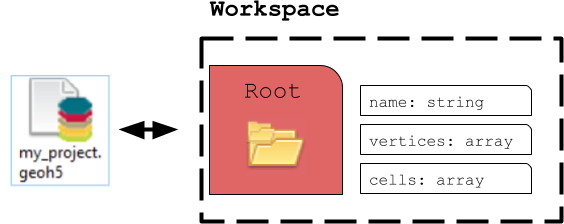
By default, the parent of any new Entity is the workspace RootGroup. It is the only entity in the Workspace without a parent. Users rarely have to interect with the Root group as it is mainly used to maintain the overall project hierarchy.
ContainerGroup#
A ContainerGroup can easily be added to the workspace and can be assigned a name and description.
from pathlib import Path

from geoh5py import Workspace
from geoh5py.groups import ContainerGroup


# Create a new project
h5file = Path("my_project.geoh5")
workspace = Workspace(h5file) if h5file.exists() else Workspace.create(h5file)

# Add a group
group = ContainerGroup.create(workspace, name="myGroup")
At creation, "myGroup" is written to the project geoh5 file and visible in the Analyst project tree.
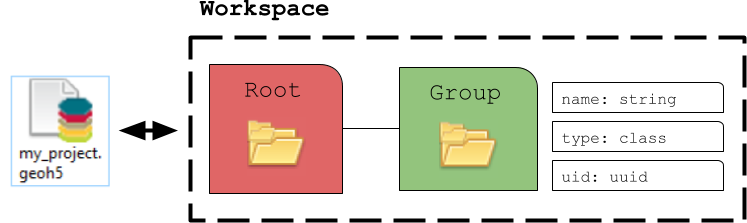
Once added to the workspace, an entity can be accessed by its name or uid (unique identifier):
print(group.uid)
print(workspace.get_entity("myGroup")[0] == workspace.get_entity(group.uid)[0])
27581549-b2e0-4442-b1c7-678ef967923c
True
Parent/child relationship#
Any object or group can be added to another group to form a tree structure. This relationship can be established from either the parent or the child entity.
We can create a new group and assign the parent at the onset.
# Would default to the Root otherwise
new_group = ContainerGroup.create(workspace, parent=group)

print(f"The parent entity is: {new_group.parent.name}")
print(f"The 'group' now has {len(group.children)} child.")
The parent entity is: myGroup
The 'group' now has 1 child.
The relationship can always be changed afterwards.
new_group.parent = workspace.root

print(new_group.parent)
print(f"The 'group' now has {len(group.children)} children.")
<geoh5py.groups.root.RootGroup object at 0x72c93b9a97f0>
The 'group' now has 0 children.
Alternatively, a child can be added from the parent.
# Defaults to the root
another_group = ContainerGroup.create(workspace)

# Transfer the custody to another group
group.add_children([another_group])

print(f"The parent entity is: {another_group.parent.name}")
print(f"The group now has {len(group.children)} child.")
The parent entity is: myGroup
The group now has 1 child.
workspace.close()