
Tipper#
This object can be used to store tipper (ZTEM) surveys - a natural-source geophysical method. Data are provided in the frequency-domain as point source measurements of tipper data.
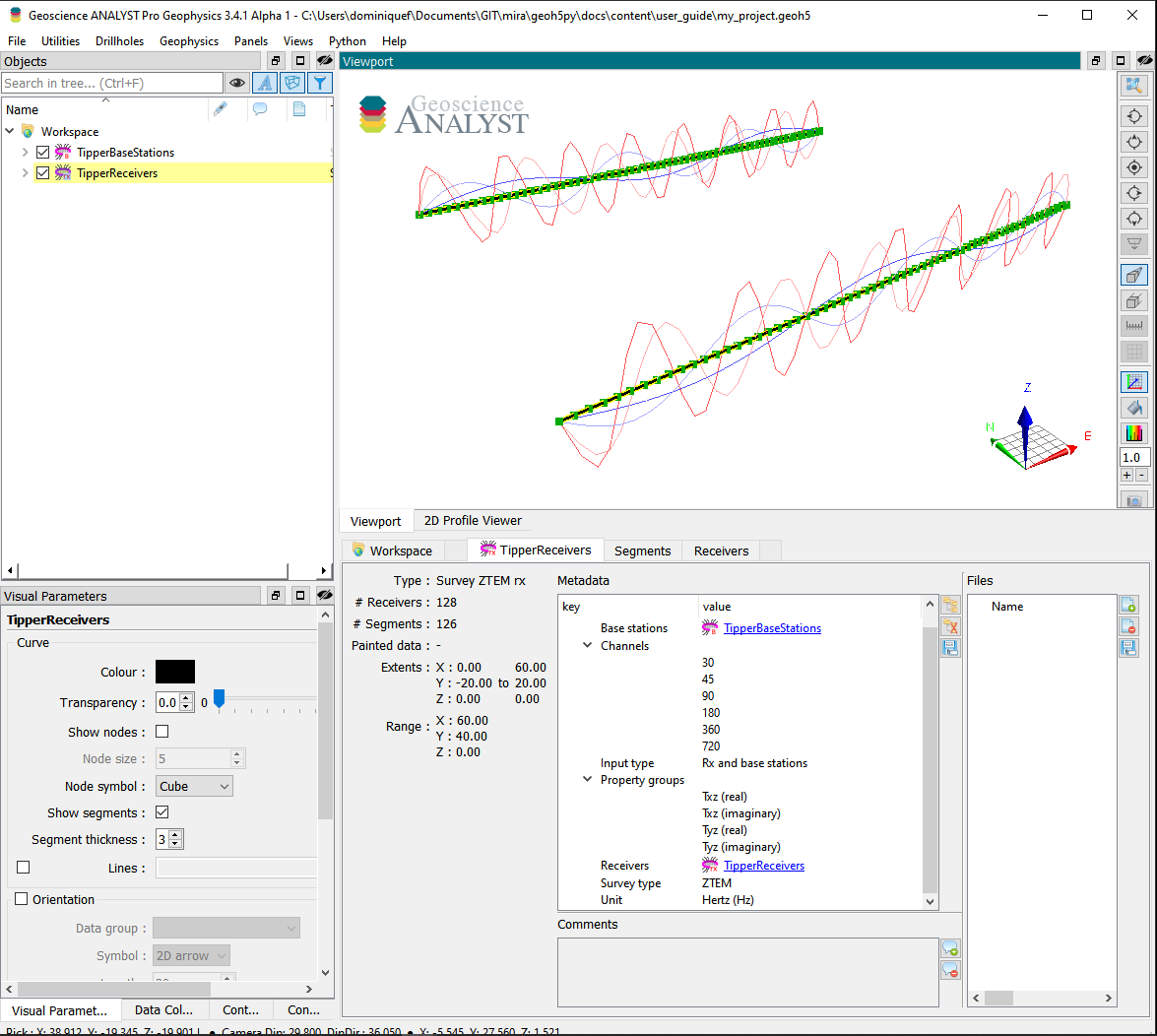
The following example shows how to generate a tipper survey with associated data stored in geoh5 format and accessible from Geoscience ANALYST.
from pathlib import Path

import numpy as np

from geoh5py.objects import TipperBaseStations, TipperReceivers
from geoh5py.workspace import Workspace


# Create a new project
h5file = Path("my_project.geoh5")
workspace = Workspace(h5file) if h5file.exists() else Workspace.create(h5file)

# Define the pole locations
n_stations = 64
n_lines = 2
x_loc, y_loc = np.meshgrid(
    np.linspace(0, 60, n_stations), np.linspace(-20, 20.0, n_lines)
)
vertices = np.c_[x_loc.ravel(), y_loc.ravel(), np.zeros_like(x_loc).ravel()]

# Assign a line ID to the poles (vertices)
parts = np.kron(np.arange(n_lines), np.ones(n_stations)).astype("int")

# Create the survey from vertices
receivers = TipperReceivers.create(workspace, vertices=vertices, parts=parts)
base = TipperBaseStations.create(workspace, vertices=vertices)
We have so far created two seperate entities, one for the receiver locations and another for the base station(s). In order to finalize the survey, the association must be made between the two entities:
receivers.base_station = base
or equivalently
base.receivers = receivers
Only one of the two options above is needed.
Metadata#
Along with the geoh5py.objects.surveys.electromagnetics.tipper.TipperReceivers, the metadata contains all the necessary information to define the geophysical experiment.
receivers.metadata
{'EM Dataset': {'Base stations': UUID('5a89de25-d5ad-4d1d-aaf2-77c6c4191375'),
  'Channels': [],
  'Input type': 'Rx and base stations',
  'Property groups': [],
  'Receivers': UUID('03a8c299-8164-41f1-b621-ddd04420aba1'),
  'Survey type': 'ZTEM',
  'Unit': 'Hertz (Hz)'}}
Channels#
List of frequencies at which the data are provided.
receivers.channels = [30.0, 45.0, 90.0, 180.0, 360.0, 720.0]
Input type#
Generic label used in the geoh5 standard for all EM survey entities. Restricted to Rx and base station in the case of a tipper survey.
Property groups#
List of geoh5py.groups.property_group.PropertyGroup instances defining the various data components (e.g. Txz (real), Tyz (imag), …). It is not required to supply all components of the impedence tensor, but it is expected that each component contains a list of data channels of length and in the same order as the Channels (one Data per frequency).
The class method geoh5py.objects.surveys.electromagnetics.base.BaseEMSurvey.add_components_data() can help users add data from nested dictionaries. Below is an example using four components:
# Arbitrary data generator using sine functions
def data_fun(c, f):
    return (c + 1.0) * (f + 1.0) * np.sin(f * np.pi * (x_loc * y_loc).ravel() / 400.0)


# Create a nested dictionary of component and frequency data.
data = {
    component: {
        f"{component}_{freq}": {"values": data_fun(cc, ff)}
        for ff, freq in enumerate(receivers.channels)
    }
    for cc, component in enumerate(
        [
            "Txz (real)",
            "Txz (imaginary)",
            "Tyz (real)",
            "Tyz (imaginary)",
        ]
    )
}

receivers.add_components_data(data)
[<geoh5py.groups.property_group.PropertyGroup at 0x7741701545f0>,
 <geoh5py.groups.property_group.PropertyGroup at 0x774164a66270>,
 <geoh5py.groups.property_group.PropertyGroup at 0x774164940b90>,
 <geoh5py.groups.property_group.PropertyGroup at 0x774164941dc0>]
Metadata are updated immediately to reflect the addition of components:
receivers.metadata
{'EM Dataset': {'Base stations': UUID('5a89de25-d5ad-4d1d-aaf2-77c6c4191375'),
  'Channels': [30.0, 45.0, 90.0, 180.0, 360.0, 720.0],
  'Input type': 'Rx and base stations',
  'Property groups': ['Txz (real)',
   'Txz (imaginary)',
   'Tyz (real)',
   'Tyz (imaginary)'],
  'Receivers': UUID('03a8c299-8164-41f1-b621-ddd04420aba1'),
  'Survey type': 'ZTEM',
  'Unit': 'Hertz (Hz)'}}
Data channels associated with each component can be quickly accessed through the geoh5py.objects.surveys.electromagnetics.base.BaseEMSurvey.components() property:
receivers.components
{'Txz (real)': [<geoh5py.data.float_data.FloatData at 0x7741901cb080>,
  <geoh5py.data.float_data.FloatData at 0x774164db8bc0>,
  <geoh5py.data.float_data.FloatData at 0x774164a2cb60>,
  <geoh5py.data.float_data.FloatData at 0x774164a67e30>,
  <geoh5py.data.float_data.FloatData at 0x774172f277d0>,
  <geoh5py.data.float_data.FloatData at 0x774164bf84a0>],
 'Txz (imaginary)': [<geoh5py.data.float_data.FloatData at 0x77418861bb00>,
  <geoh5py.data.float_data.FloatData at 0x774164ac70b0>,
  <geoh5py.data.float_data.FloatData at 0x774164ac64e0>,
  <geoh5py.data.float_data.FloatData at 0x774164ac63f0>,
  <geoh5py.data.float_data.FloatData at 0x774164ac6240>,
  <geoh5py.data.float_data.FloatData at 0x774164ac5e50>],
 'Tyz (real)': [<geoh5py.data.float_data.FloatData at 0x774188619370>,
  <geoh5py.data.float_data.FloatData at 0x774164ac6450>,
  <geoh5py.data.float_data.FloatData at 0x774164940680>,
  <geoh5py.data.float_data.FloatData at 0x7741649407d0>,
  <geoh5py.data.float_data.FloatData at 0x774164940920>,
  <geoh5py.data.float_data.FloatData at 0x774164a888c0>],
 'Tyz (imaginary)': [<geoh5py.data.float_data.FloatData at 0x7741901cb410>,
  <geoh5py.data.float_data.FloatData at 0x7741649417c0>,
  <geoh5py.data.float_data.FloatData at 0x774164941880>,
  <geoh5py.data.float_data.FloatData at 0x7741649419d0>,
  <geoh5py.data.float_data.FloatData at 0x774164941b20>,
  <geoh5py.data.float_data.FloatData at 0x774164941c70>]}
Receivers#
Generic label used in the geoh5 standard for EM survey to identify the geoh5py.objects.surveys.electromagnetics.tipper.TipperReceivers entity.
Base stations#
Generic label used in the geoh5 standard for EM survey to identify the geoh5py.objects.surveys.electromagnetics.tipper.TipperBaseStations entity.
Survey type#
Label identifier for ZTEM survey type.
Unit#
Units for frequency sampling of the data: Hertz (Hz), KiloHertz (kHz), MegaHertz (MHz) or Gigahertz (GHz).
workspace.finalize()