
Tipper#
This object can be used to store tipper (ZTEM) surveys - a natural-source geophysical method. Data are provided in the frequency-domain as point source measurements of tipper data.
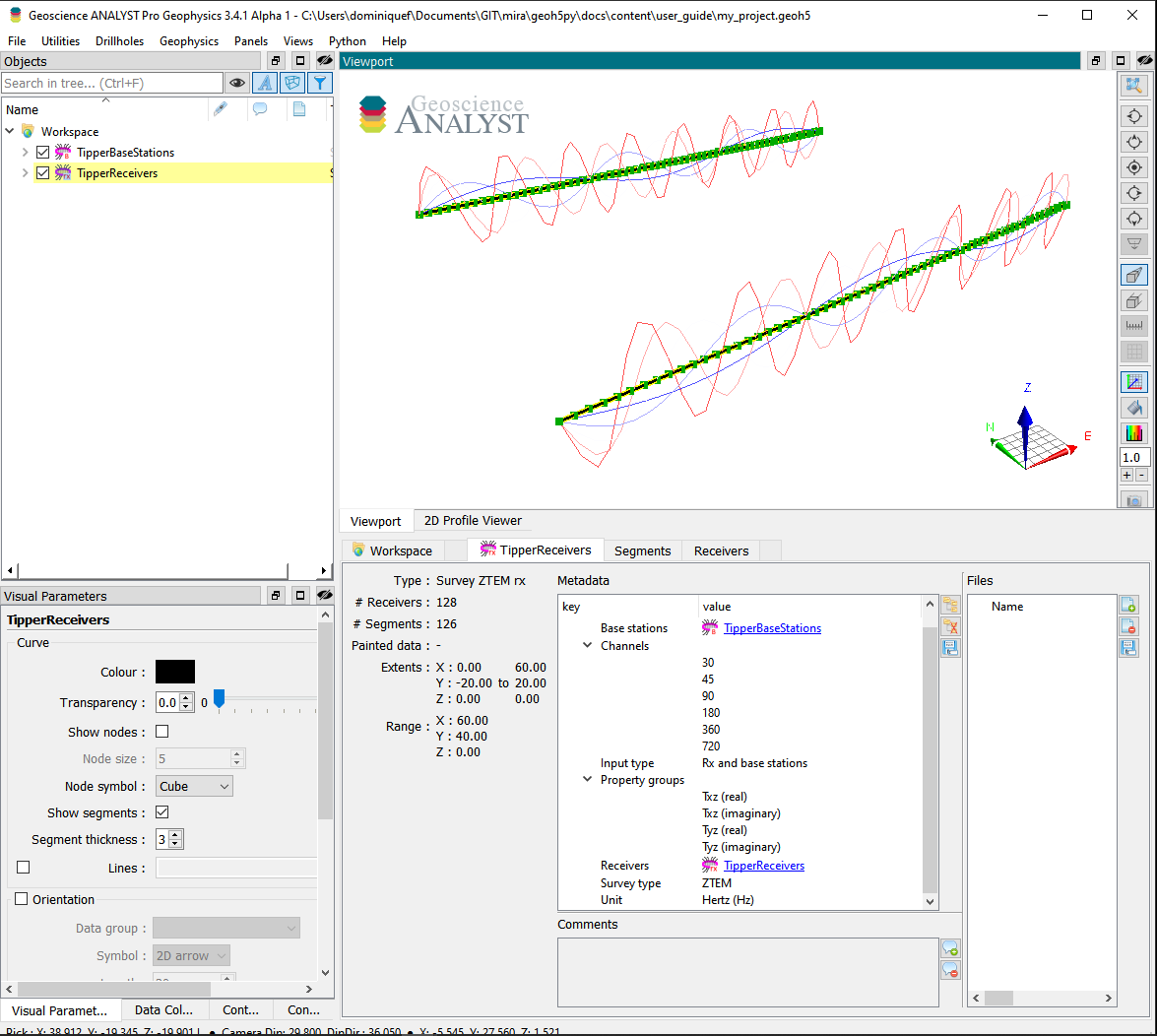
The following example shows how to generate a tipper survey with associated data stored in geoh5 format and accessible from Geoscience ANALYST.
import numpy as np

from geoh5py.objects import TipperBaseStations, TipperReceivers
from geoh5py.workspace import Workspace


# Create a new project
workspace = Workspace("my_project.geoh5")

# Define the pole locations
n_stations = 64
n_lines = 2
x_loc, y_loc = np.meshgrid(
    np.linspace(0, 60, n_stations), np.linspace(-20, 20.0, n_lines)
)
vertices = np.c_[x_loc.ravel(), y_loc.ravel(), np.zeros_like(x_loc).ravel()]

# Assign a line ID to the poles (vertices)
parts = np.kron(np.arange(n_lines), np.ones(n_stations)).astype("int")

# Create the survey from vertices
receivers = TipperReceivers.create(workspace, vertices=vertices, parts=parts)
base = TipperBaseStations.create(workspace, vertices=vertices)
/home/docs/checkouts/readthedocs.org/user_builds/mirageoscience-geoh5py/conda/v0.12.2/lib/python3.10/site-packages/geoh5py/workspace/workspace.py:1107: UserWarning: From version 0.8.0, the 'h5file' attribute must be a string or path to an existing file, or user must call the 'create' method. We will attempt to `save` the file for you, but this behaviour will be removed in future releases.
  warnings.warn(
We have so far created two seperate entities, one for the receiver locations and another for the base station(s). In order to finalize the survey, the association must be made between the two entities:
receivers.base_station = base
or equivalently
base.receivers = receivers
Only one of the two options above is needed.
Metadata#
Along with the TipperReceivers, the metadata contains all the necessary information to define the geophysical experiment.
receivers.metadata
{'EM Dataset': {'Base stations': UUID('31730e9e-806d-4593-8e67-e2068ec8ade8'),
  'Channels': [],
  'Input type': 'Rx and base stations',
  'Property groups': [],
  'Receivers': UUID('badb74f0-a96a-42f1-a568-b1e432e020f2'),
  'Survey type': 'ZTEM',
  'Unit': 'Hertz (Hz)'}}
Channels#
List of frequencies at which the data are provided.
receivers.channels = [30.0, 45.0, 90.0, 180.0, 360.0, 720.0]
Input type#
Generic label used in the geoh5 standard for all EM survey entities. Restricted to Rx and base station in the case of a tipper survey.
Property groups#
List of PropertyGroups defining the various data components (e.g. Txz (real), Tyz (imag), …). It is not required to supply all components of the impedence tensor, but it is expected that each component contains a list of data channels of length and in the same order as the Channels (one Data per frequency).
The class method add_components_data can help users add data from nested dictionaries. Below is an example using four components:
# Arbitrary data generator using sine functions
def data_fun(c, f):
    return (c + 1.0) * (f + 1.0) * np.sin(f * np.pi * (x_loc * y_loc).ravel() / 400.0)


# Create a nested dictionary of component and frequency data.
data = {
    component: {
        f"{component}_{freq}": {"values": data_fun(cc, ff)}
        for ff, freq in enumerate(receivers.channels)
    }
    for cc, component in enumerate(
        [
            "Txz (real)",
            "Txz (imaginary)",
            "Tyz (real)",
            "Tyz (imaginary)",
        ]
    )
}

receivers.add_components_data(data)
[<geoh5py.groups.property_group.PropertyGroup at 0x7441c0a03b20>,
 <geoh5py.groups.property_group.PropertyGroup at 0x7441c0ae4610>,
 <geoh5py.groups.property_group.PropertyGroup at 0x7441c0ae56c0>,
 <geoh5py.groups.property_group.PropertyGroup at 0x7441c0ae6770>]
Metadata are updated immediately to reflect the addition of components:
receivers.metadata
{'EM Dataset': {'Base stations': UUID('31730e9e-806d-4593-8e67-e2068ec8ade8'),
  'Channels': [30.0, 45.0, 90.0, 180.0, 360.0, 720.0],
  'Input type': 'Rx and base stations',
  'Property groups': ['Txz (real)',
   'Txz (imaginary)',
   'Tyz (real)',
   'Tyz (imaginary)'],
  'Receivers': UUID('badb74f0-a96a-42f1-a568-b1e432e020f2'),
  'Survey type': 'ZTEM',
  'Unit': 'Hertz (Hz)'}}
Data channels associated with each component can be quickly accessed through the BaseEMSurvey.components property:
receivers.components
{'Txz (real)': [<geoh5py.data.float_data.FloatData at 0x7441c0a02b60>,
  <geoh5py.data.float_data.FloatData at 0x7441c0a03700>,
  <geoh5py.data.float_data.FloatData at 0x7441c0a03af0>,
  <geoh5py.data.float_data.FloatData at 0x7441c0a02e00>,
  <geoh5py.data.float_data.FloatData at 0x7441c0a03b50>,
  <geoh5py.data.float_data.FloatData at 0x7441c0a03eb0>],
 'Txz (imaginary)': [<geoh5py.data.float_data.FloatData at 0x7441e44fe5c0>,
  <geoh5py.data.float_data.FloatData at 0x7441e44fe500>,
  <geoh5py.data.float_data.FloatData at 0x7441e46abdf0>,
  <geoh5py.data.float_data.FloatData at 0x7441e46abac0>,
  <geoh5py.data.float_data.FloatData at 0x7441c0ae43a0>,
  <geoh5py.data.float_data.FloatData at 0x7441c0ae44f0>],
 'Tyz (real)': [<geoh5py.data.float_data.FloatData at 0x7441e44fe620>,
  <geoh5py.data.float_data.FloatData at 0x7441c0ae4340>,
  <geoh5py.data.float_data.FloatData at 0x7441c0ae5240>,
  <geoh5py.data.float_data.FloatData at 0x7441c0ae5360>,
  <geoh5py.data.float_data.FloatData at 0x7441c0ae5480>,
  <geoh5py.data.float_data.FloatData at 0x7441c0ae55a0>],
 'Tyz (imaginary)': [<geoh5py.data.float_data.FloatData at 0x7441e466b0a0>,
  <geoh5py.data.float_data.FloatData at 0x7441c0ae5150>,
  <geoh5py.data.float_data.FloatData at 0x7441c0ae62f0>,
  <geoh5py.data.float_data.FloatData at 0x7441c0ae6410>,
  <geoh5py.data.float_data.FloatData at 0x7441c0ae6530>,
  <geoh5py.data.float_data.FloatData at 0x7441c0ae6650>]}
Receivers#
Generic label used in the geoh5 standard for EM survey to identify the TipperReceivers entity.
Base stations#
Generic label used in the geoh5 standard for EM survey to identify the TipperBaseStations entity.
Survey type#
Label identifier for ZTEM survey type.
Unit#
Units for frequency sampling of the data: Hertz (Hz), KiloHertz (kHz), MegaHertz (MHz) or Gigahertz (GHz).
workspace.finalize()